
How to Keep Night Shift On Mac All The Time (24/7 Guide)
If you’re reading this, you’re probably frustrated. You love the warm, amber tint of Night Shift on your Mac, but macOS keeps turning it off. Maybe you want it on 24/7 for sensitive eyes, or maybe you just prefer the warmer look. But Apple’s implementation has other plans.
Want Night Shift to just stay on? Night Shift Keeper does it automatically. Free to download.
Download Free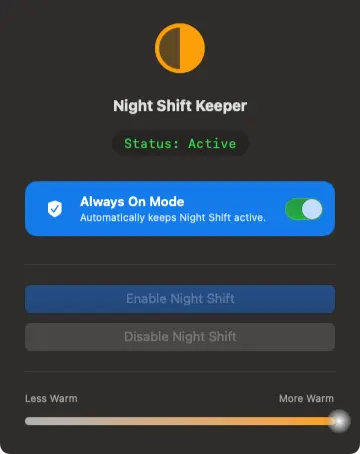
The Problem: macOS Force-Quits Night Shift at Sunrise
Apple designed Night Shift to mimic the sun’s cycle. It’s supposed to help you sleep better by reducing blue light in the evening. That’s great for most people, but what if you work in a basement with artificial lighting all day? Or what if you simply find the blue light from your screen harsh at 10 AM?
By default, macOS only allows two scheduling options regarding Night Shift:
- Sunset to Sunrise: Automatically uses your location to turn it on at night.
- Custom Schedule: Lets you set a start and end time.
Here’s the catch: Even with a custom schedule, macOS will eventually turn it off. If your Mac goes to sleep, restarts, or simply hits the "end" time of your schedule, Night Shift disables itself. There is no native "Always On" button in System Settings.
Why Manual Toggling Doesn’t Work
Sure, you can go into the Control Center or System Settings and manually toggle Night Shift on. But you have to do this every single time your Mac wakes from sleep or restarts. It’s a repetitive, annoying chore that disrupts your workflow.
Many users search for "how to force night shift mac 24/7" or "override mac night shift schedule" only to find complex Terminal commands or heavyweight apps that drain battery.
The Solution: Night Shift Keeper
This is exactly why we built Night Shift Keeper. It’s a tiny, native utility designed to do one thing perfectly: Keep Night Shift on, no matter what.
How It Works
- ✓Prevents Resets: It monitors the Night Shift state and instantly re-enables it if macOS tries to turn it off.
- ✓Survives Sleep & Restart: When you open your lid or reboot, your screen stays warm. No blinding blue light flash.
- ✓Native Performance: Unlike other apps that overlay a colored filter (which kills performance and color accuracy), Night Shift Keeper uses the actual native macOS Night Shift engine.
Stop Fighting Your Mac’s Settings
You shouldn’t have to fight your operating system to be comfortable. If you want a warm screen all day to reduce eye strain, you should have it.
Night Shift Keeper gives you that control back. It’s a "set it and forget it" solution for the "Fixer" in you who just wants the Mac to behave.
Get Night Shift Keeper Today
The only app that genuinely forces macOS Night Shift to stay on 24/7.
Download Free for macOSFree to download and try • Always On unlocks with a one-time $16.99 license • 7-day money-back guarantee