
Keep Night Shift Always On
No Hacks. No Resets.
Automatically keep your Mac's Night Shift active 24/7 – even after sleep or reboot. Say goodbye to daily toggles and eye strain.
Free download • Always On unlocks with a $16.99 one-time license • 7-day money-back guarantee
macOS Won't Let You Keep Night Shift On All the Time
Night Shift switches off when its schedule ends.
Manual toggles are buried in System Settings.
Goes off after sleep or display wake.
Workarounds are unreliable and technical.
Apple's Night Shift is great—until it turns off when you need it most. Users across forums are frustrated by its limitations. Night Shift Keeper fixes all of that automatically.
Meet Night Shift Keeper – The Always-On Night Mode for macOS
24/7 Night Shift
Keeps Night Shift running around the clock – no resets.
Auto-Reapply After Sleep
Re-enables Night Shift after sleep, reboot, or display changes.
Custom Color Temperature
Adjust warmth to your comfort.
Lightweight and Native
Uses macOS native display features – no background bloat.
Simple. Focused. Works Every Time.
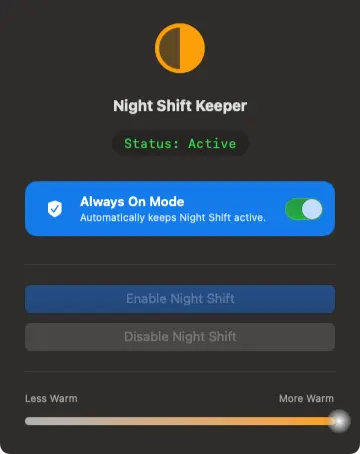
Designed for clarity and control — self‑distributed, no app store required.
A Warm Screen, All Day – Starting Today
One-time license — unlocks Always On
- ✓Free to download and try
- ✓Includes all future updates
- ✓No subscription required
- ✓7‑day money‑back guarantee
- ✓Lifetime support
Night Shift Guides
How Night Shift works, why it turns off, and how it compares to f.lux and other apps.
- How to Keep Night Shift On All the Time on Mac
- How to Turn On Night Shift on Mac (and Schedule It)
- Night Shift vs True Tone vs Dark Mode on Mac
- Night Shift Keeps Turning Off on Mac? 7 Fixes That Work
- f.lux vs Night Shift vs Other Blue Light Apps on Mac (2026)
- Best f.lux Alternatives for Mac in 2026
- f.lux for Mac in 2026: Review, Download & Alternatives
- Does Night Shift Actually Block Blue Light?
- How to Reduce Eye Strain on Mac: Display Settings That Help
Frequently Asked Questions
Is Night Shift Keeper free?
Yes, the app is free to download and use. Only the Always On feature — keeping Night Shift active 24/7 — requires a one-time $16.99 license.
Does this override Apple's system settings?
No. It uses the same system APIs, just in a smarter way that stays active.
Will this affect performance or battery?
No noticeable effect. It's a small native app that runs locally, and the warming itself is done by macOS's own Night Shift.
Can I still use the built-in Night Shift settings?
Yes. Night Shift Keeper enhances them and adds persistence.
Is it safe and secure?
Yes. It runs locally on your Mac and doesn't track you or collect personal data.